
If you have worked at a campaign that bought an "all-in-one platform," you may have seen this problem. You sign in once and see four tabs. In the SMS (text message) tab, there is a contact named Maria Santos with a phone number and a 3-message conversation. In the email tab, there is also a contact named Maria Santos, with a slightly different email address and seven email opens. The chatbot tab has a third record for Maria, from the same neighborhood, with no phone number. The CRM tab (the shared contact database, where the donor records are kept) has a fourth Maria with her address and donation history but no text or email activity.
The result is one person with four contact records and no single timeline of her activity.
That has been our experience with every "unified" platform we have paid for. The login was shared, but the data was not, so staff spent Monday mornings copying notes between tabs.
The design we chose instead
When we started building CoreCNX, our first decision was about the structure of the data rather than any feature. We chose the only structure we would want to use ourselves: one contact record per person, which every product writes to.
That may sound obvious, but most multi-product platforms are not built this way. Usually each product keeps its own contact table, meaning its own list of contacts in the database (for example, sms_contacts, email_contacts, chatbot_contacts and crm_contacts). A scheduled "sync" job then tries to match the lists. That job typically runs hourly, has bugs and creates duplicate records when a phone number changes. It also causes more urgent calls to the support team than any other part of the system.
We did not want to build that. CoreCNX has one contacts table instead. Beacon (door-to-door canvassing), CampaignCNX+ (texting) and Alma (the website chatbot) all write to it, and so does the email tool built into CoreCNX. There is no sync job, because there are no separate lists to match.
The entire design argument for the suite is one contact record, written to by every product, with a timeline that connects the events. It is also the part that is hardest to change once a platform has been built the other way.
How each event is matched to the right contact
How an event finds the right record
- An event arrivesFrom Beacon, CampaignCNX+, Alma or email, with a phone number, an email address or both.
- Phone number first(312) 555-0142 and +1 312 555 0142 count as the same number.
- Then email addressChecked when no record has that phone number.
- A new record if neither matchesCreated with the name the product sent.
- Added to the timelineAn event that arrives twice is recorded once.
The difficult part of having every product write to one record is matching. When a canvasser records a door-knock result in Beacon, Beacon sends CoreCNX a webhook (an automatic message from one system to another) with a name, a phone number, an address and sometimes an email address. CoreCNX must then decide whether this is an existing contact or a new one.
Our rule is to match by phone number first. We compare the incoming phone number with the contacts table, and if we find a match, the event is added to that contact's timeline. If there is no match, we try the email address. If neither matches, we create a new contact. That rule runs on every event from every product, so a door knock at Maria's house, a text reply from Maria's phone and an email open from Maria's address all end up on the same record, even though three different products produced them.
The method is simply one rule applied to every event, with no exceptions for any product.
Why the timeline connects every event
Once every event is attached to the right contact, the next question is how to display it. CRM software usually gives each type of event its own tab, such as a "calls" tab, a "texts" tab and an "emails" tab. We dislike that design, because it hides what staff actually want to see, which is the full history, in order, of this person's contact with your campaign.
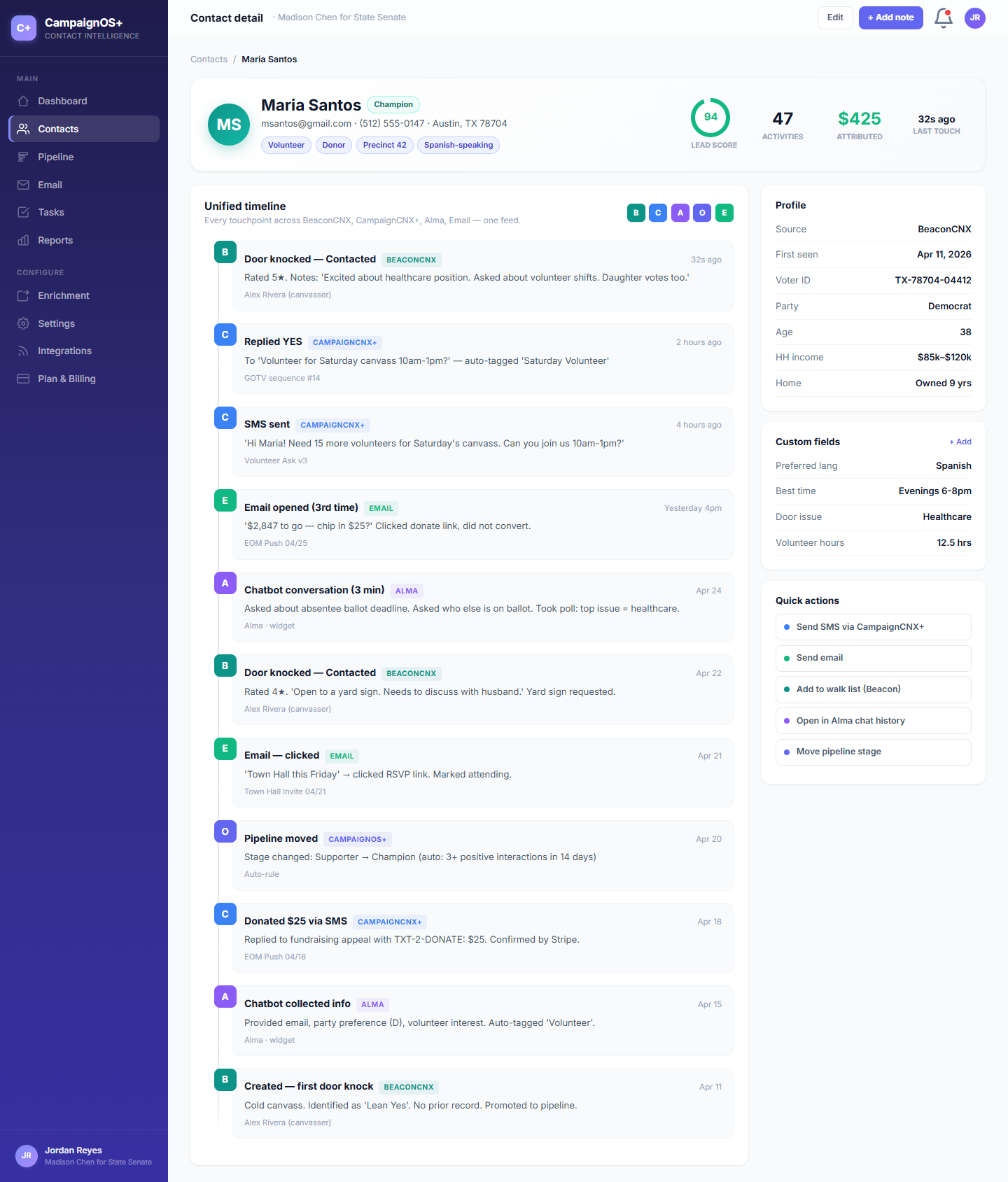
For that reason, the contact view in CoreCNX is deliberately a simple list in date order. A door knock might appear at the top, with a text reply below it, then a chatbot conversation, an email open, a pipeline move (a change in the contact's stage) and another door knock. Each row is marked with the product that produced it (door knocks are teal, texts are blue, chatbot conversations are purple and emails are emerald), so you can see each source at a glance within the timeline.
This may seem like a small design choice, but it shapes the rest of the system. If the timeline is the main view, every event must be complete on its own. Each event needs a contact, a date and time, a source and enough text to make sense by itself. As a result, every product that writes to CoreCNX must produce events in roughly the same format, even though the products do very different things.
What this lets you do that other CRMs can't
Dana Whitfield
- CoreCNXMoved to stage: VolunteerToday
- CampaignCNX+SMS replyYesterday
- EmailOpened email: Volunteer orientation on Thursday3 days ago
- AlmaSubmitted info via chatbot: name, email, phone1 week ago
- BeaconDoor knocked, Contacted2 weeks ago
- CoreCNXNote: Asked about a yard sign. Prefers texts to calls.2 weeks ago
Once the data is organized this way, tasks that used to be impossible for campaign staff become simple.
- "Did the voter whose door we knocked on yesterday text us back today?": Open the voter's record. The door knock and the text reply appear one after the other on the same timeline.
- "Who is in the donor stage, and what has each of them heard from us?": Filter the contact list by pipeline stage, then open any record to see every channel in one place.
- "How many times have we contacted this person, and on which channels?": Their timeline lists every event, marked with its source, and can be filtered by source. In other CRMs, the same question could take an hour of spreadsheet work.
CoreCNX exists to make questions like these easy to answer. They are easy because of how the data is structured, rather than because of any special feature added on top.
The trade-off we made
The cost of this design is that CoreCNX is stricter than other CRMs, because every product must share one set of contact records. If you want a CRM where the texting tool keeps its own list and only sometimes shares data with the email tool, CoreCNX is not the right fit. It is also not the right fit if you want separate products that share a login but otherwise work independently.
CoreCNX is built around one contact record per person, written to by every product in the suite, with a timeline that connects the events. That choice defines the product. Everything else (the pipeline, the email composer, the reports and the connections to other software) is built on top of it. We call CoreCNX the spine of the suite because Beacon, CampaignCNX+ and Alma all depend on it.
Once you have used a CRM built this way, the older design, with four separate tabs presented as one system, is clearly a temporary workaround that became permanent.